
Rolling Offers
A rolling offer puts open spots in front of many acts at once and lets them claim on a first-come, first-served basis. The first act to claim a spot is confirmed on the spot, straight into the lineup.
You can either share a link using your distribution network (mailing list or socials), or, in Pro tier, you can pick specific rosters to send the rolling offer out to.
Why offer spots this way
The main use case is filling any empty spots / last minute drop-outs on the day. The link option is also a good fit for first-come-first-serve open mics.
One offer instead of ten conversations. Send the same spots to a whole roster and let the acts sort out who takes what.
Acts can pick the spot that matches their availability - as acts are confirmed when they claim the spot, in rolling offer the call time and stage time are explicitly spelled out.
Instant confirmation. A claimed spot is booked. The act sees it in My Shows and you see them in the lineup.
Cap the number of spots an act can claim this way. Offer spots across a run of shows and cap how many any one act can take.
Create an offer
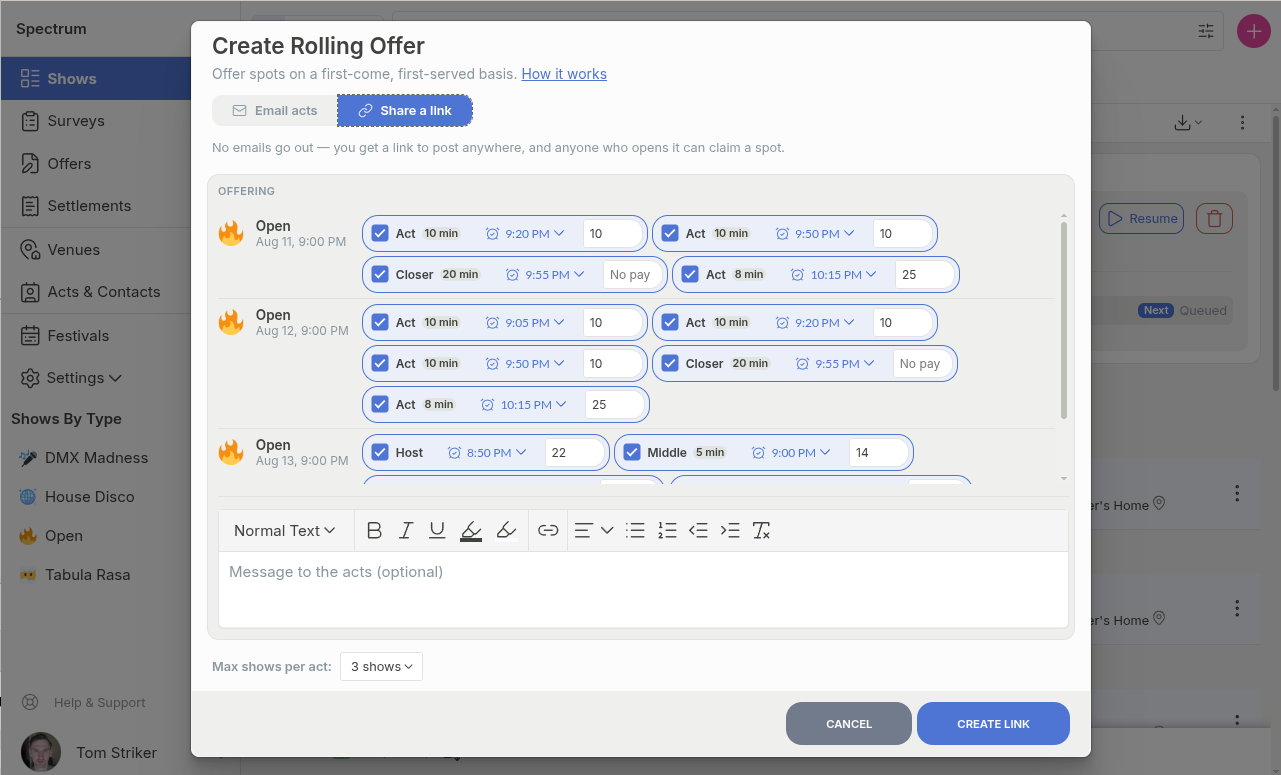
To create a rolling offer, either click on the show row and pick Create rolling offer, or select several shows in the listing and use the rolling offer button in the toolbar.
Tick the spots you want to fill.
If it's a last minute call, update the call time and fee (e.g. relax the call time by allowing for the act to show up just 10 minutes before the spot, and increase the fee to attract more acts)
Add a message if there is anything you want to add about the rolling offer
Pick whether you'll be sharing a link in your network, or if you'd like to send out emails to specific rosters (emailing is limited to Pro, Pro+, and Unlimited tiers).
When the offer spans more than one show, Max shows per act allows you to limit how many shows a single act can claim. Handy when you want to spread a run across as many acts as possible.
Distribution option one: share a link
Confirmed will generate a link that you can post to wherever your acts already are: a Facebook group, a WhatsApp thread, your socials, your website, the bottom of a newsletter, and so on. This is similar to surveys, with the exception that acts are automatically confirmed when they claim the spots first-come-first-serve. This option can be perfect for first-come-first serve open mics.
Distribution option two: email your acts (pro tier)
In pro tier, instead of generating the link, you can select which rosters the rolling call should go out to. "All applied acts" is an extra roster in this case that adds to the pool acts that applied to any of the selected shows.
With email option, in order to not spam 200 acts all at once, Confirmed will send out the offers in batches, with a preset delay between the batches. The pool of acts is shuffled beforehand so that same acts don't always get the first dibs. You can control the size of the batches as well as the interval between the emails. The rolling call will stop itself once all of the spots you selected have been filled, or it has run out of recipients.
Follow the rolling offer it as it fills
Active offers sit in a strip above your show list, showing how many spots are filled and, for email offers, how many acts have been offered so far. Open the act list to see who has been sent to, who is queued next, and when the next batch goes out. Here you can:
Pause and resume an email offer whenever you want to hold the queue.
Remove queued acts before their batch goes out.
Delete the offer to stop it entirely. Spots already claimed stay booked.
Spots that are part of an ongoing rolling offer are marked in the lineup as well, so that you quickly see, which ones are still up for grabs.
Questions
Can two acts claim the same spot?
No. The first claim wins. If someone opens a stale page and claims a spot that has just gone, they see what is still available instead.
Do I have to confirm the claims?
No. That is the point of a rolling offer. Only offer spots you are happy for any of these acts to take, and use a roster to keep the offer limited to the acts you trust.
What happens when the spots run out?
The offer completes and stops sending. Anyone who opens the link or an earlier email sees that everything has been filled.
Can an act claim spots in several shows?
Yes, up to the Max shows per act limit you set. They can also take a second category in a show they are already in.