
DMX Lighting with Showtime
What is Showtime?
Showtime is our comedy club showrunning software that helps you control the lights, sound, and screens in your venue from a computer such as a Chromebook.
Showtime is available exclusively to Confirmed customers. You must have an active Confirmed Pro or Confirmed Unlimited subscription to purchase a Showtime licence.
Pricing
On an annual contract, a Showtime licence costs £29/month (EUR 35, USD 39, AUD 59) per performance space.
If you operate multiple performance spaces in the same venue, or operate from multiple venues, you will require multiple licences. We offer bulk discounts for multiple licences.
If you only operate a venue for a limited time (e.g. during a festival), you can add the Showtime subscription for just the time you require a licence.
What You Can Do with Showtime
Using Showtime, you can:
Configure lighting effects and control a DMX-linked lighting rig
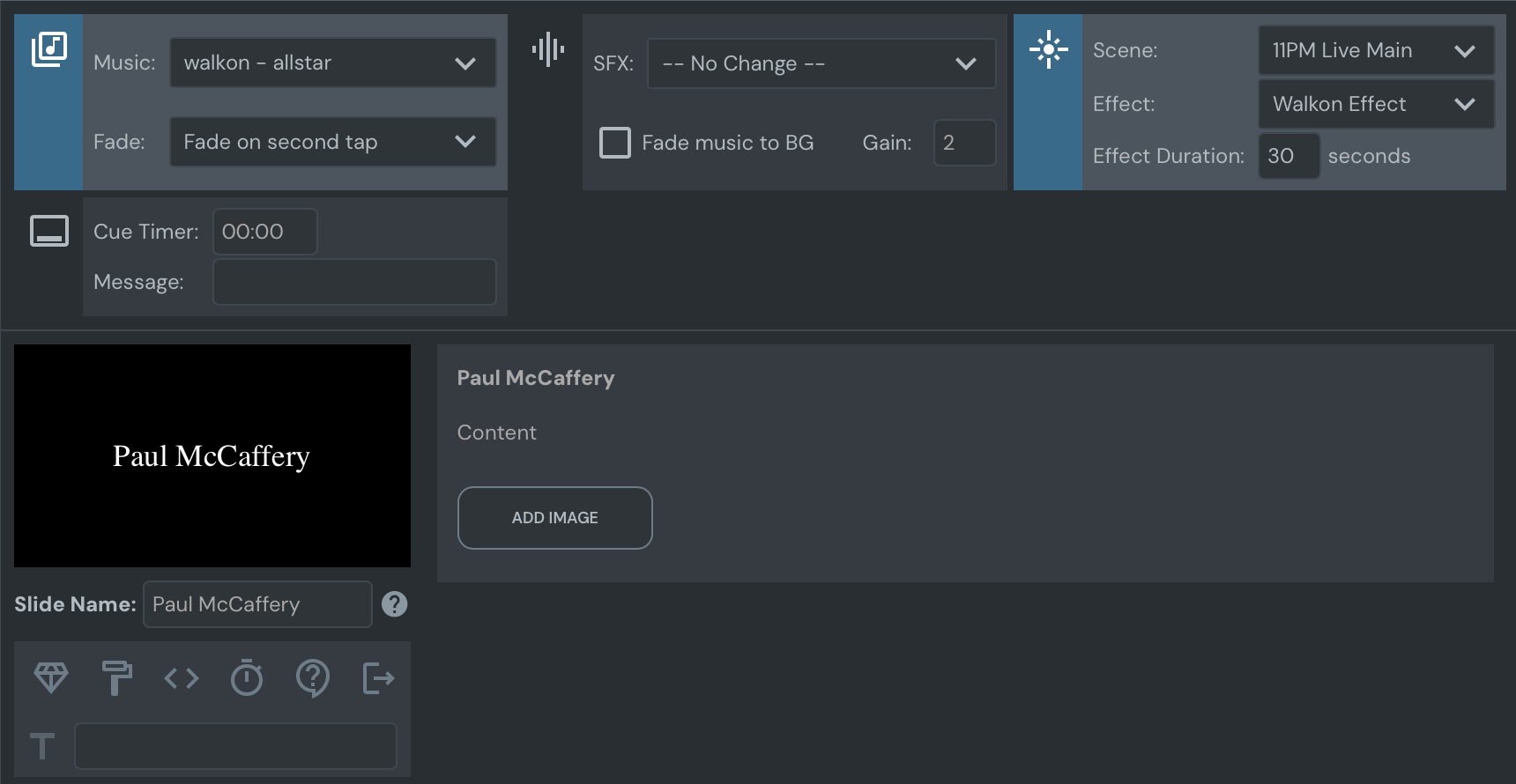
Configure walk-on lighting effects that sync with the music
Display graphics on screens, including dynamically pulled data about your acts (names, social media handles, photos) and promotional information such as bar deals and future shows
Play walk-on stings and interval playlists automatically
Set up preset lighting states (effects, chases, and scenes) for each show type that automatically load when a show is scheduled
Hardware Requirements
Showtime runs on any computer that runs Google Chrome. We recommend buying a dedicated Chromebook—the Samsung Galaxy Chromebook Go is a great choice. The LTE version allows you to use mobile data to connect to the Internet if venue wifi is unavailable.
You can also control Showtime using a hardware MIDI controller.
DMX Interface
You will need hardware to convert the USB signal from your computer to a DMX signal for your lights. We recommend the Enttec DMX USB Pro interface with a 5-pin to 3-pin converter.
If you need a backup option in a pinch, dmx.monster provides a basic virtual lighting desk. The page is cached for offline use, so it will work even if the internet dies after the first load.
Recommended Gear
We've tested and used these fixtures across multiple comedy club installations. They offer excellent quality at reasonable prices.
DMX Dongle
Enttec DMX USB Pro Interface – Professional USB to DMX converter with a 5-pin to 3-pin converter.
Spotlights
Chauvet DJ Eve Par 140 VW LED Spotlight – Excellent for white lights with high-quality output.
Cameo TS 60 RGBW LED Theater-Spot – A great option that delivers nice quality white light and also does color.
ADJ Mega Hex Par Flat LED Par Can – Perfect for colored spotlight work including UV (with a very low profile design). Also great for pointing around the room as house lights. These produce very high-quality light, but note that the white light quality isn't as good as the Chauvet for stage lighting.
ADJ Mega TRIPAR Profile Plus LED Par Can – Another great option good for all sorts of effects. We'd probably go with the Hex since you also get amber light (good for house lighting) and slightly better build quality.
Moving Heads
Stagg Headbanger XT RGBW 70W LED Mini Moving Head – Get two or four behind the stage pointing down or scanning the audience during breaks.
LED Bars
ADJ UBL12H Hex LED Bar – If you want UV capability, though this is a pricier option.
Equinox SpectraPix Batten LED Light Bar – A good affordable option. You can get several of these to surround the stage and point down at the acts, use as uplighters behind the stage, or as house lighting.
Mix and match these fixtures based on your venue size and budget. Start with basic spotlights and add moving heads or bars as you expand your production capabilities.
Understanding DMX Lighting
What is DMX?
DMX (Digital Multiplex) is a communication protocol that allows you to control stage lighting and effects. It sends instructions from a controller (in this case, your computer running Showtime) to lighting fixtures via a standard cable.
DMX Universes and Channels
A DMX universe is a single network of up to 512 channels. Each channel controls one parameter of a light fixture—such as dimmer, red value, green value, strobe speed, or pan/tilt movement.
For example, a simple RGB wash light might use 3 channels (red, green, blue), while a moving head might use 16+ channels for color, movement, gobo selection, and effects.
How Showtime Compares to Hardware Desks
Showtime triggers lights in the same way a traditional hardware lighting desk would, but it's far more convenient for live comedy shows. With one tap of the spacebar, you can simultaneously:
Trigger a lighting scene
Start the act countdown timer
Play a walk-on music cue
Display the performer's graphics on screens
This integration means everything stays in sync without juggling multiple controllers.
Programming Your Lighting
Venue-Level Configuration
Light fixtures are described at the venue level, and all shows in that venue will have access to them. You can also set up baseline presets at the venue level and copy them to specific shows.
To access venue lights:
Head to https://confirmed.show
Select the correct production in the top-left corner
Click on Venues
Pick your venue
Click on the "lights" icon on the top right
Bookmark the resulting URL for quick access later.
Fixtures vs. Scenes
Once in the venue lights section, you'll see two buttons on the top right that let you switch between:
Fixtures – Where you describe your physical lighting equipment
Scenes – Where you create saved lighting looks
The fixtures section is a bit rough—our apologies in advance! We're working on improving the interface.
Creating Scenes and Effects
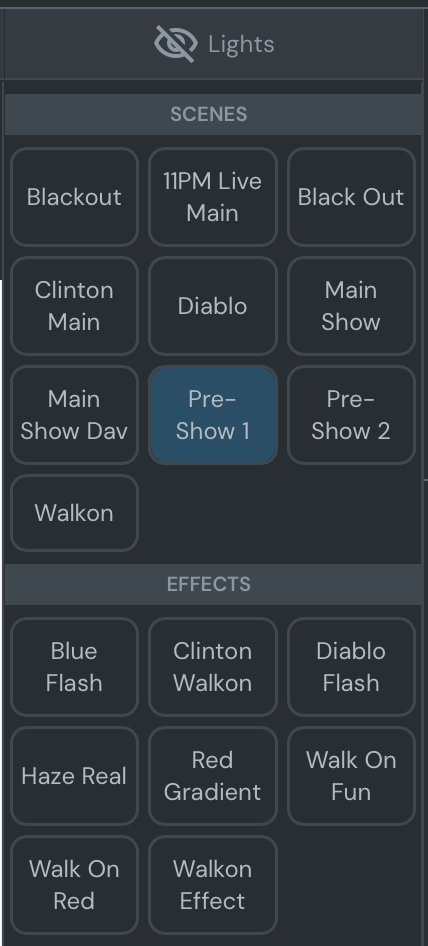
When describing scenes, turn on any of your fixtures and an option to Save Scene/Effect will appear at the bottom.
Scenes vs. Effects
Understanding the difference between scenes and effects is important:
Scenes are your base lighting states (e.g. "Pre-Show Warmup", "Main Act Spotlight", "Blackout")
Effects are dynamic layers you overlay on top of scenes (e.g. "Lightning Flash", "Strobe", "Color Chase")
For example, you might have an "Autumn Scene" with warm amber lighting, and then press a lightning effect button to simulate a storm on top of that base look.
Fixture Controls
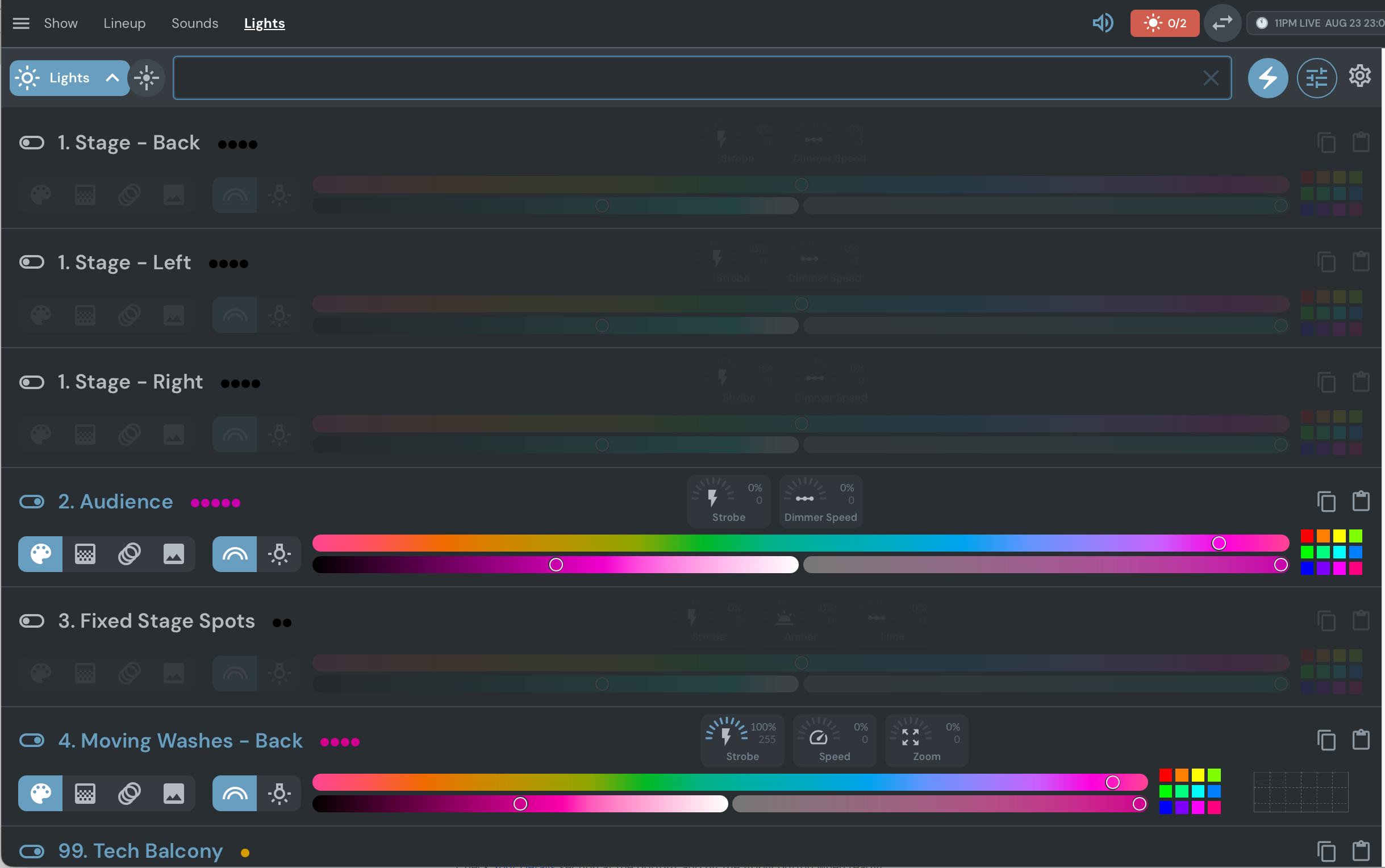
When programming individual fixtures, you have access to multiple control modes and parameters:
Modes – Palette, grid, spotlight, or image-based control
Sliders – Strobe percentage, dimmer speed, zoom, and other parameters
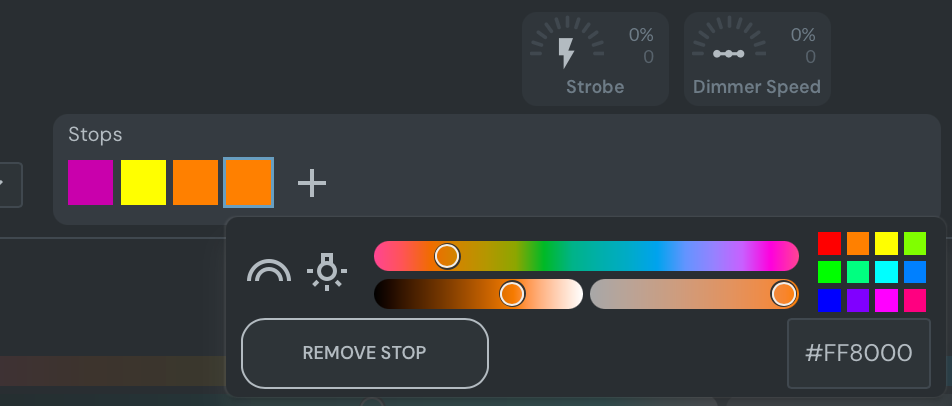
Color controls – Gradient sliders, color stops, hex values, and preset grids
Remember to save your work! Changes aren't automatically saved until you click Save Scene/Effect.
Show-Level Lighting
For most shows, lighting won't change from performance to performance. To simplify your workflow, create one master show per show type and set the date to the last day of August. This gives you a template entry for each show type.
Running a Show
To run a show:
Find your show in the list
Click the three dots on the right
Select "Run show"
Importing Venue Presets
Once in a specific show, click the cog icon on the top right to import venue scenes. This way, each show starts with your baseline presets rather than from scratch.
Live Performance Control
During a live show, Showtime integrates your lighting with other production elements:
Lights tab – Select scenes and trigger effects
Sounds tab – Play walk-on music, sound effects, and interval playlists
Show/Lineup tab – Track act timing and progress
Slides/Media tab – Display performer graphics and promotional content
Everything syncs together, so pressing spacebar during an act's intro can trigger their lighting cue, play their walk-on music, start the timer, and display their name on screens—all at once.
Professional Setup Support
If you need help setting up your system, we can do this for you. We've advised half a dozen comedy clubs in the UK and Europe on achieving high-level production with fully customised light shows on minimal budgets.
Setup support costs £65 per hour, with a minimum charge of £260. We can help with:
Advice on lighting fixtures, lighting design, and lighting for filming
Advice and creative support on branding the VFX
Configuration of lights with Showtime
Audience Surveys (Optional Add-On)
To take your productions to the next level, you can involve your audience by inviting them to scan a QR code and load a custom web app. We'll generate a custom web page that displays contextual information such as act names, social media handles, drinks promotions, email capture, voting options (e.g. gong shows), and more.
Audience Surveys is priced per show:
£8 – Up to 100 connections
£12 – Up to 350 connections
£28 – Up to 1,500 connections
Custom pricing – Above 1,500 connections
Use Cases for Audience Surveys
Panel shows – Invite the audience to answer pre-show questions, vote during the show, and choose challenges (like RGB Monster's flagship show "Not My Audience").
Gong or competition shows – Get the audience to vote on acts during or after the show. Act names are automatically included since their information is already in Confirmed.
Tasting, experience, or corporate shows – Dynamically display content, questions, and supplementary information while talent is on stage. The in-app experience is designed to augment rather than distract from the main event, with full customisation including co-branding opportunities.
Marketing giveaways – Capture customer email addresses in exchange for prizes or tickets. You can even turn audience phone screens into a live roulette to choose winners.
Show feedback – Ask the audience what they thought of the acts, your club, and the experience in an easy-to-use form.
Known Limitations
Internet Connection
An internet connection is necessary to use Showtime. Once a show and its assets have been loaded, the software will still operate if the internet drops. However, we cannot guarantee this.
The Samsung Galaxy Chromebook Go LTE version provides mobile data backup if venue wifi fails.
Sound
Showtime outputs one stereo audio mix. We do not support lossless or high fidelity file compression, nor surround sound.
Lighting
We only support lights that use the DMX protocol.