Apply for a spot
Productions use Confirmed to collect applications and availability through availability surveys. These surveys let you see available spots, filter what you're interested in, and apply in just a few steps.
You do not need a Confirmed account in advance — one will be created automatically once you apply using the survey.
Public survey links are typically shared in Facebook forums, private WhatsApp groups, and emailed to mailing lists maintained by comedy clubs.
Step 1: Select the spots you want to apply for
Tick the checkbox next to each spot you'd like to apply for.
You can:
Apply for multiple spots across different dates
Apply for different spot lengths or roles
Leave spots unticked if you're not available or not interested
It's courteous to only apply for spots that you are able and willing to perform in.
Step 2: Verify your email address (first-time users)
If this is your first time using Confirmed, we'll ask you to verify your email address.
This is important because:
It's where any spot offers will be sent
It ensures productions can get in touch with you
It links your application to your Confirmed account
Check your inbox and follow the verification step to continue.
Step 3: Complete the information requested by the production
Next, you'll be asked to provide any information the production requires to review applications.
This can vary by show, but may include:
A link to a performance clip
A headshot or promo image
Information about your comedy experience
Banking or payment details (for paid spots)
Any additional notes requested by the producer
This information will be saved for your convenience, and may be reused for future applications.
Step 4: Submit your application
Once everything is complete, submit the survey.
That's it — your application and availability are now visible to the production inside Confirmed. All your applications are tracked in the My Applications page.
Submitting an application does not guarantee a spot. The production will review all submissions before making offers.
Viewing and managing your applications
After you've applied for spots, you can see all your applications in one place at confirmed.show/me/applications.
You can also access this page from the left-side menu (look for "My Applications")
The My Applications page shows:
All spots you've applied for
Payment information (if applicable)
Link to the survey so that you can update your availability if necessary
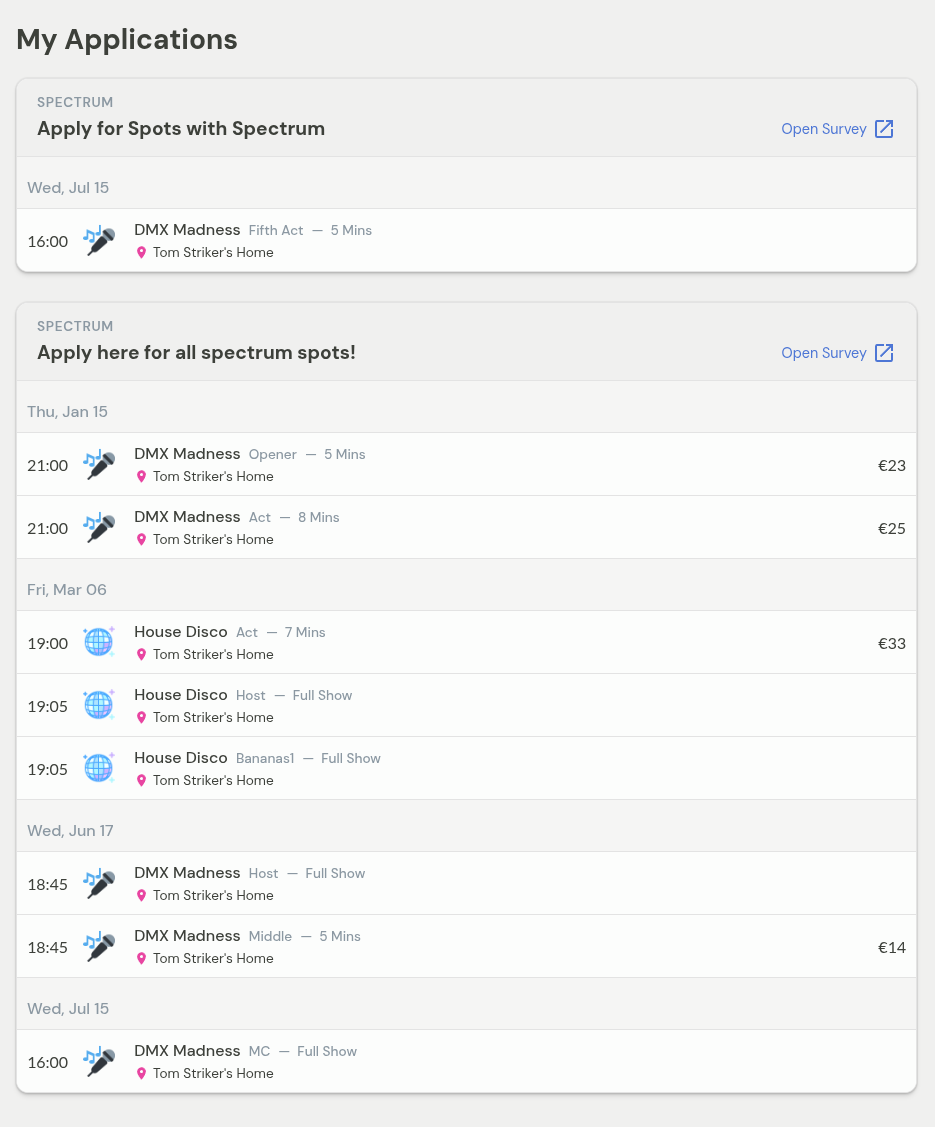
From this page, you can click Open Survey to revisit any application and update your availability or details.
Updating your availability later
You can return to the same survey link at any time to update your availability or details. You can access the survey either from the original link or from the Open Survey button on your My Applications page.
Productions will always see the most up-to-date information you submit.
What happens if you're booked?
You'll receive an email offer if you're offered a spot. Once confirmed, the booking will also appear in the My Shows section.
What happens when spots are filled?
As spots are filled they are automatically removed from the live survey. If you don't see a spot anymore, it means it might have already been filled.
Key things to remember
You can only apply via a public survey link shared by a production
You don't need an account in advance
View all your applications at confirmed.show/me/applications
You can update your application by reopening the survey from My Applications or the original link
Filled spots disappear automatically
All offers are sent by email